Restaurant Operations
QR Code Waitlist for Restaurants: How It Works & How to Set It Up
Learn how to set up a QR code waitlist for your restaurant, reduce crowded waiting areas, and let guests join the queue from their phones without downloading an app.
SeatPing Team

A full dining room shouldn't mean a crowded entrance. But when guests gather near the host stand, waiting for their names to be called, even a busy restaurant can struggle with crowded entrances and constant questions about wait times.
A QR code waitlist for restaurants offers a simpler solution. Guests scan a code, enter their details, and join a virtual queue directly from their phones, without downloading an app or creating an account.
In this guide, we'll explain how QR code waitlists work, why restaurants use them, and how to set one up with SeatPing.
What Is a QR Code Waitlist for Restaurants?
A QR code waitlist is a digital waiting list that guests access by scanning a code posted at the restaurant. Instead of relying entirely on a host with a clipboard, guests can enter their own information on a mobile-friendly page.
Here's what the guest journey looks like:
Scan the code. The guest opens their phone camera and scans the restaurant's QR sign.
Join the queue. They enter their name, party size, and preferred notification method.
Wait more comfortably. Their party is added to the digital queue, so they don't have to stand at the entrance just to stay on the list.
Receive updates. Depending on the restaurant's messaging setup, they can get queue notifications through SMS, WhatsApp, or email.
Get seated. Staff use the live queue to coordinate arrivals and seating as tables become available.
The important distinction: a virtual queue doesn't automatically shorten the time it takes for a table to open. It makes that wait easier to manage and communicate.
QR Code Waitlist vs. Traditional Paper Waitlist: Which Is Better?
Traditional paper waitlists can work for restaurants with fewer walk-ins, but they become harder to manage during busy hours. A QR code restaurant waitlist offers a more convenient way to manage guests, reduce crowded entrances, and improve communication.
Here's how the two compare:
Feature | Paper Waitlist | QR Code Waitlist With SeatPing |
|---|---|---|
Guest Check-in | Staff-assisted | Self-check-in |
Waiting Experience | Near the entrance | Wait anywhere |
Waitlist Management | Handwritten & paper-based | Digital dashboard |
Guest Notifications | Verbal announcement | Digital & on-the-go notifications |
Guest Information | Manual records | Digital guest profiles |
Why Choose a QR Code Waitlist?
For restaurants with regular walk-in traffic, a digital waitlist makes guest check-ins and queue management easier. With SeatPing, restaurants can manage waiting parties, reservations, and table availability from one platform, helping staff stay organized during busy dining hours.
Setting up a digital waitlist is only the first step. To keep things running smoothly during peak dining hours, read our guide on How to Manage a Restaurant Waitlist During Busy Hours.
How to Set Up a QR Code Waitlist With SeatPing
You don't need a dedicated kiosk to get started. With SeatPing's Business Portal, you can configure a restaurant location, download its QR code, and manage the queue using an existing computer or phone.
Step 1: Create and Publish Your Restaurant Location
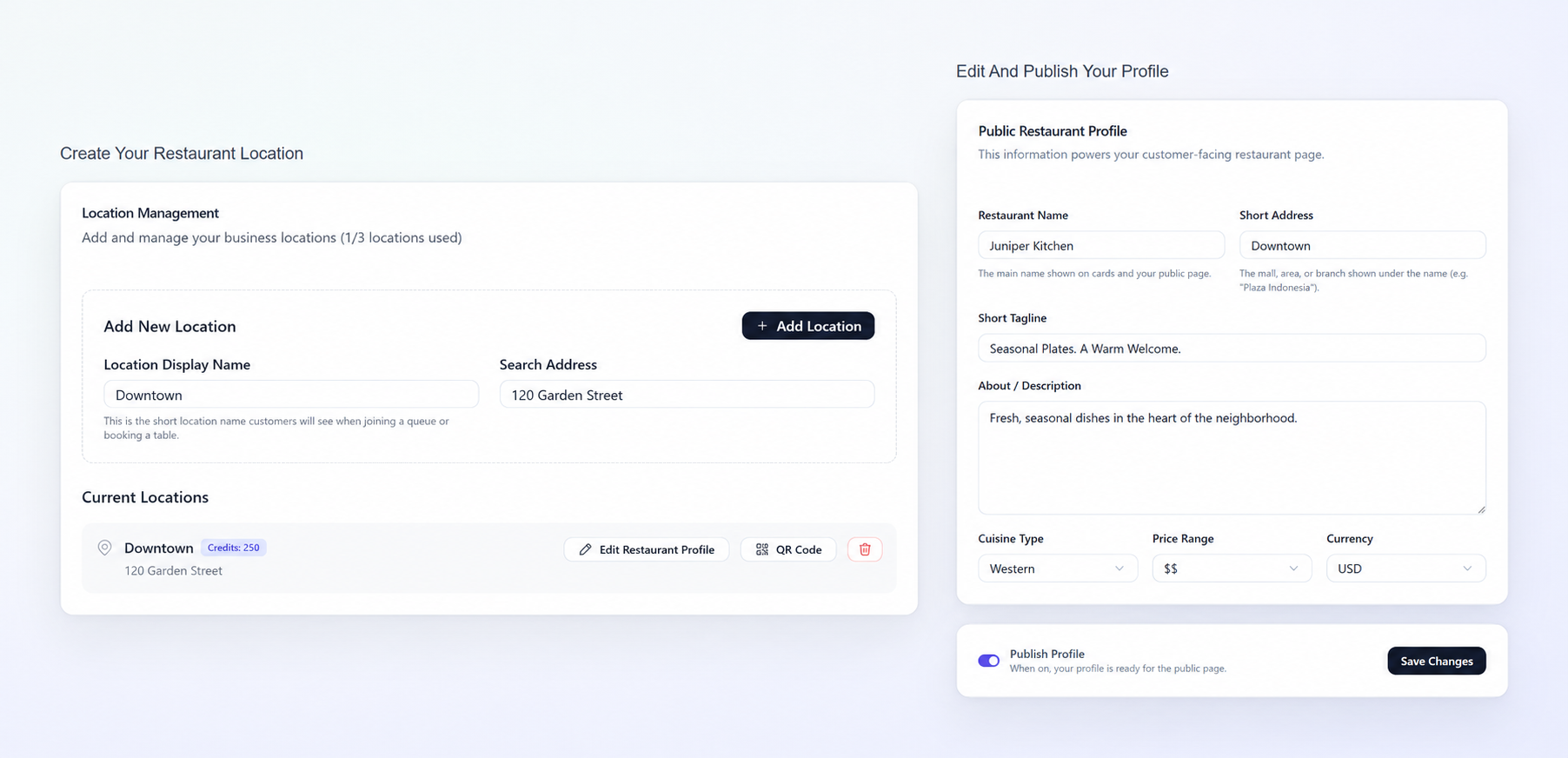
Sign in to SeatPing and open Business Settings. Enter your location's display name and address, then select Add Location.
Next, choose Edit Restaurant Profile and review the information customers will see:
Restaurant details and address
Opening hours
Menu information
Reservation settings, if you also accept bookings
Turn on Publish Profile, then select Save Changes. Publishing matters: the public restaurant profile must be available before you start sharing its QR code.
Step 2: Download and Display Your QR Code
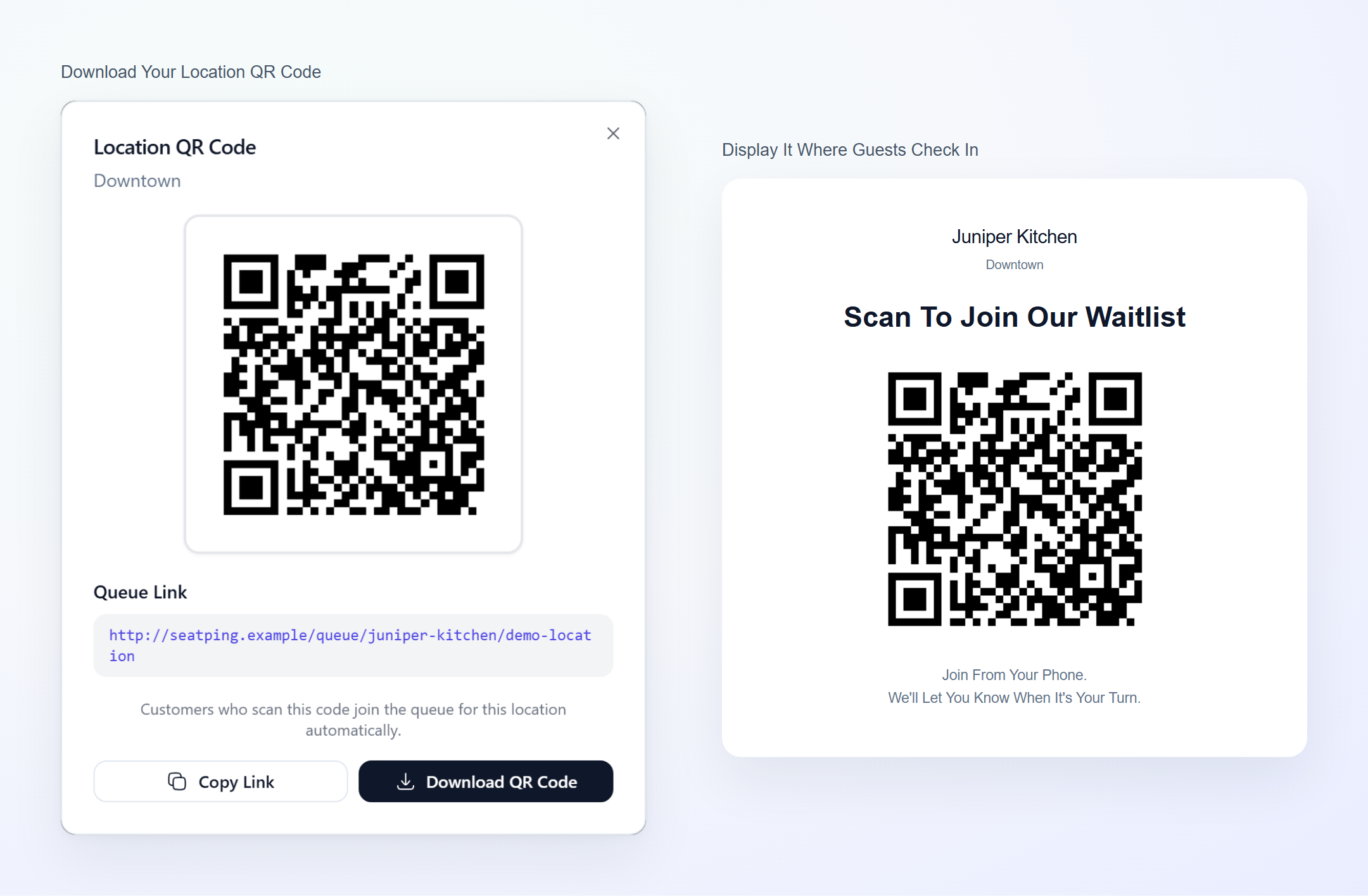
In the location management area, select QR Code to view or download the code for that location. Print it with a simple instruction, such as "Scan to Join Our Waitlist."
Place the sign where guests naturally check in, such as the entrance or host stand. Use a high-contrast design, keep the QR code unobstructed, and test it in your restaurant's actual lighting.
Step 3: Let Guests Join on Their Phones
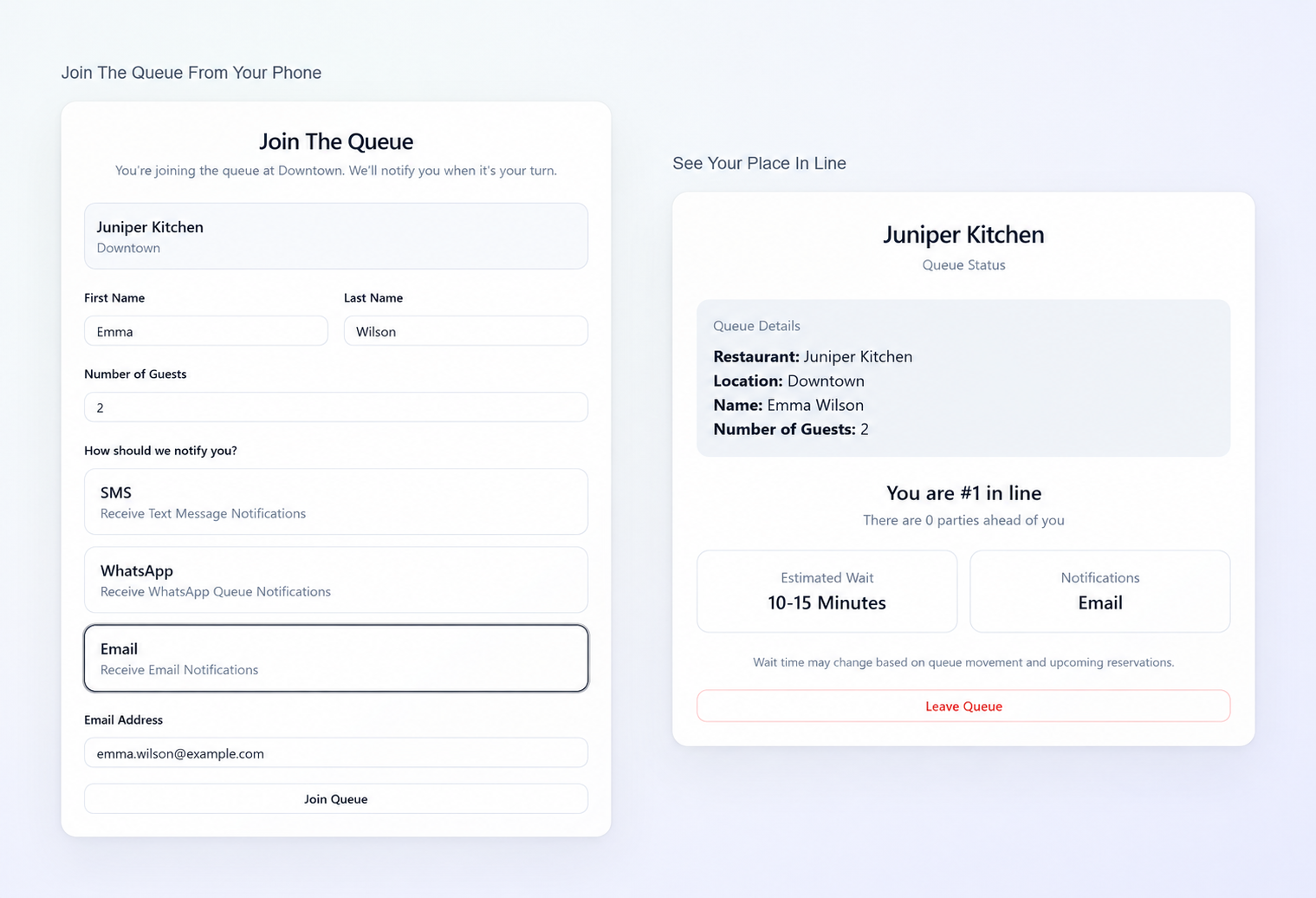
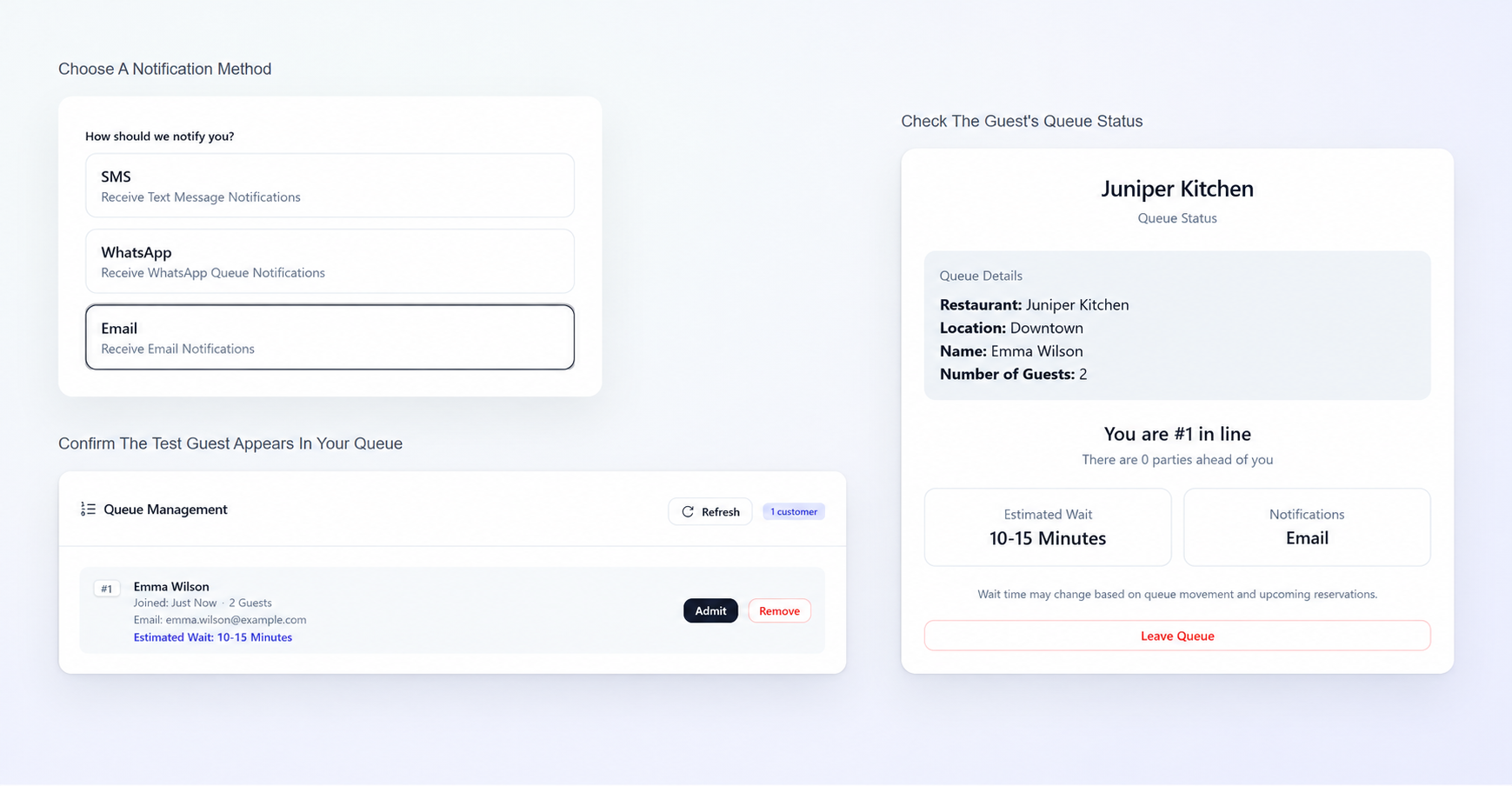
When guests scan the code, SeatPing opens a mobile-friendly queue form. They can provide their name, party size, and notification preference without creating a customer account or installing an app.
This keeps the check-in process straightforward, especially for first-time visitors who don't want to sign up for another service.
Step 4: Manage Waiting Parties With Floor Management
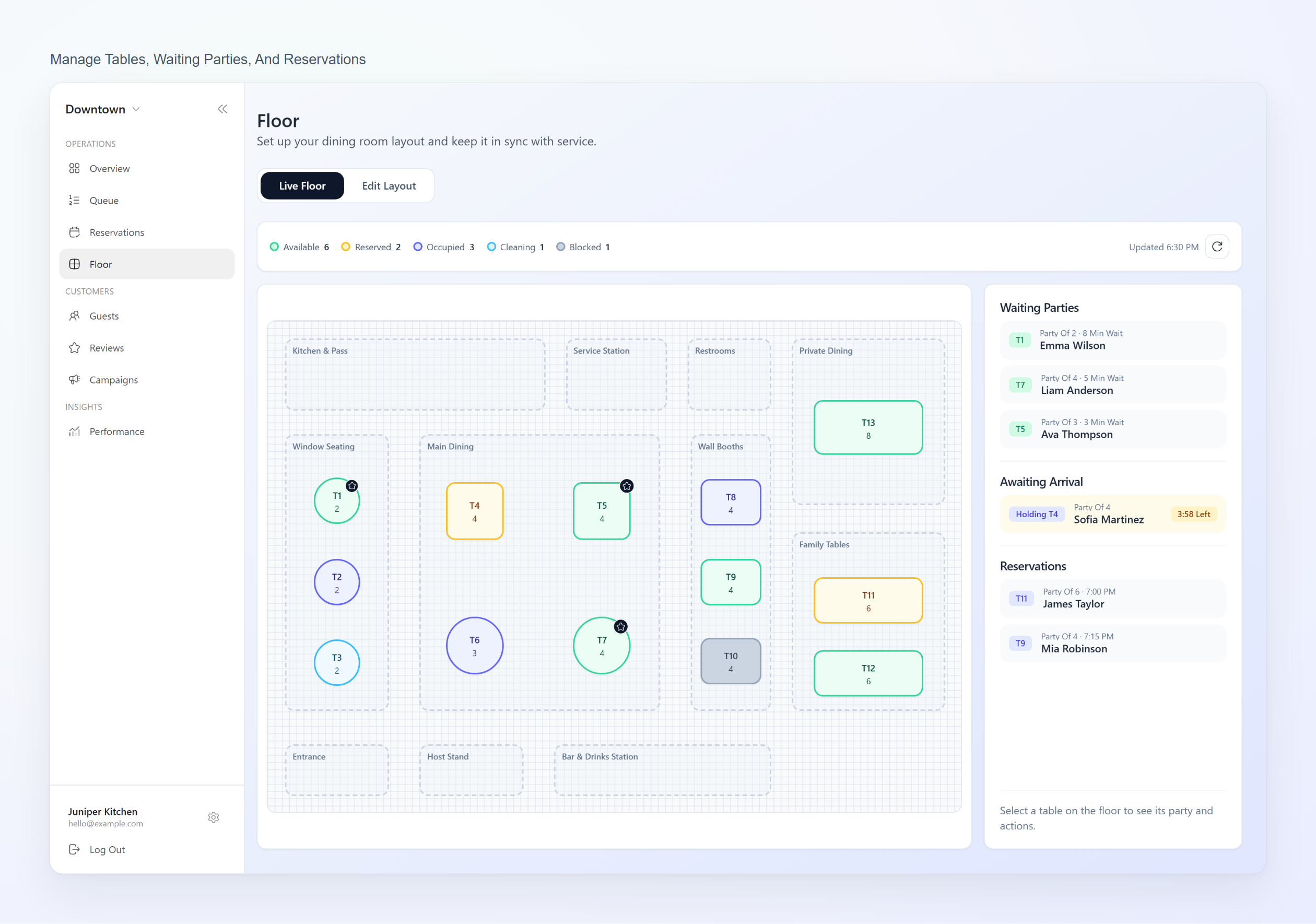
Open SeatPing Floor Management to view your restaurant's table availability, waiting guests, and reservations in one place.
The Live Floor displays tables with color-coded statuses, including Available, Reserved, Occupied, Cleaning, and Blocked.
Alongside the floor plan, staff can monitor three sections:
Waiting Parties: Guests currently waiting for a table.
Awaiting Arrival: Guests who have been admitted but have not yet arrived.
Reservations: Scheduled bookings for the day.
Staff can coordinate seating using SeatPing's smart table assignments or manually adjust assignments when needed.
For restaurants handling both walk-ins and advance bookings, understanding how restaurant waitlists and reservations work together can help staff coordinate seating more efficiently during busy hours.
Step 5: Configure Notifications and Test the Full Flow
SeatPing supports queue-related notifications through SMS, WhatsApp, and email, subject to the restaurant's configured messaging channels. Check which options are active for your location rather than assuming every channel is ready to use.
Before displaying the sign to customers, test the experience yourself:
Scan the printed code and confirm it opens the correct location.
Join as a test guest and check that the party appears in the live queue.
Verify any configured notifications and the guest's queue status experience.
Make sure staff know how to help people who can't or don't want to scan a code.
Remove test entries and use fictional data in any public screenshots.
A test before service is far easier than troubleshooting the guest check-in process during a dinner rush.
How QR Code Waitlists Help Restaurants Manage Guest Information
A QR code waitlist doesn't just organize waiting guests. It can also help restaurants maintain guest profiles and track previous visits.
With SeatPing's Guest CRM, restaurants can manage guest information, while its Campaigns tools support permission-based follow-up communications.
Restaurants should also protect customer information by collecting only what's necessary and limiting access to guest records. For more guidance, see the FTC's recommendations for protecting personal information.
Ready to Simplify Your Restaurant's Waitlist?
Make guest check-ins easier with SeatPing. Manage virtual queues, reservations, and table seating from one platform.
Explore SeatPing for Business to get started.
Frequently Asked Questions About QR Code Restaurant Waitlists
Do Customers Need to Download an App to Join a QR Code Waitlist?
No. With SeatPing, customers can scan a QR code and join the restaurant's virtual waitlist directly through their phone's browser. No app download or customer account is required.
Can Restaurants Use QR Code Waitlists Alongside Reservations?
Yes. Restaurants can use QR code waitlists to manage walk-in guests while accepting advance reservations. SeatPing supports both through one platform, helping staff coordinate arrivals and table availability.
Can Guests Receive SMS or WhatsApp Waitlist Notifications?
Yes. SeatPing supports SMS, WhatsApp, and email notifications, depending on the restaurant's messaging configuration. These allow restaurants to communicate queue updates without relying entirely on calling out names.
Do QR Code Waitlists Reduce Restaurant Wait Times?
A QR code waitlist doesn't necessarily make tables available faster. However, it can simplify check-ins, improve queue management, and allow guests to wait more comfortably instead of standing near the entrance.
Can Small Restaurants Use a QR Code Waitlist?
Yes. QR code waitlists can work for restaurants of all sizes, including cafés and small dining establishments. They're particularly useful for businesses with limited waiting space or busy walk-in periods.